You own the source
Markdown and YAML in your repo. No account, no service.
Write your project instructions and agents once, in your repository. agnostic-ai sync writes the file each tool reads, in its own format.
Install agnostic-aiAll install options
curl -fsSL https://raw.githubusercontent.com/Chemaclass/agnostic-ai/main/scripts/install.sh | bashmodel: fastagnostic-ai syncEdit each file by hand
.claude/agents/reviewer.mdClaude Codemodel: haikumodel: haiku.codex/agents/reviewer.tomlCodexmodel = "gpt-6-luna"model = "gpt-5.4-mini".gemini/agents/reviewer.mdGemini CLImodel: gemini-3.5-flashNo agent yet.Every AI coding tool ships its own config file. Adopt three and your instructions live in three places, drifting apart. agnostic-ai keeps one source in your repository and writes the rest.
Markdown and YAML in your repo. No account, no service.
Same input, same bytes. Catch drift in CI with sync --check.
Each tool reads its own files. Sync flags what a tool cannot use.
The generated files keep working.
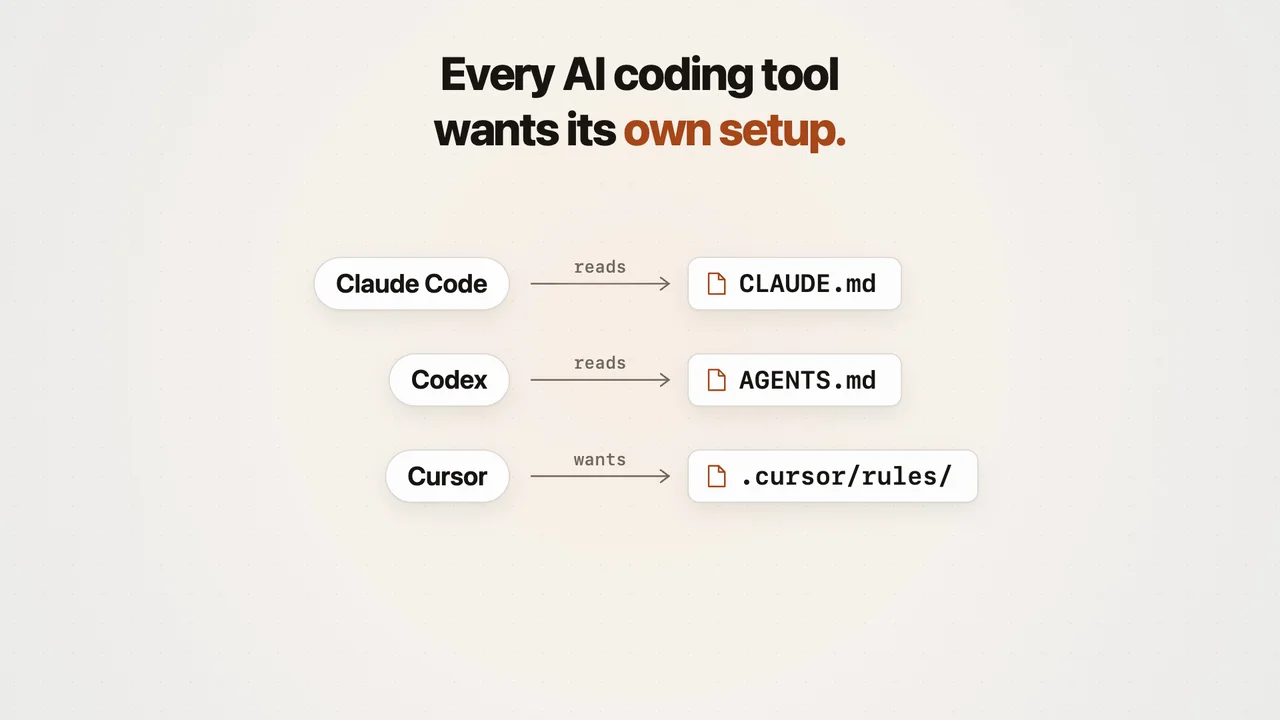
Each tool reads a different format at a different path. A symlink shares bytes. It cannot translate them.
See how the formats divergeagnostic-ai initRun this in your project. Pick Claude Code and Codex, or the tools you use. Accept the import offer to keep existing instructions.
.agnostic-ai/AGNOSTIC_AI.mdAdd a short instruction, such as the test command for your project. This is the source you maintain.
agnostic-ai syncPreview with agnostic-ai sync --plan, then sync. With Claude Code and Codex, your note is in AGENTS.md, and CLAUDE.md points at it.
agnostic-ai syncChange the note and sync again. Every tool you picked reads the new text.
Everything lives in .agnostic-ai/, next to agnostic-ai.yaml, which picks your tools and model tiers. Pick an entry to see its source and what sync writes for each tool.
Project instructions, written into each tool's root file. Select rules/ to see where rules land.
# Billing API

- Run `pnpm test` before every commit.
- Never edit `prisma/migrations/` by hand.
sync
# Billing API

- Run `pnpm test` before every commit.
- Never edit `prisma/migrations/` by hand.# Billing API
- Run `pnpm test` before every commit.
- Never edit `prisma/migrations/` by hand.# Billing API
- Run `pnpm test` before every commit.
- Never edit `prisma/migrations/` by hand.Subagents with a role, what they may do, and a model. model: fast names a tier from agnostic-ai.yaml, and sync writes each tool's model and effort.
---
name: test-writer
description: Writes a failing test that reproduces a bug. Use before fixing it.
can: [read, edit]
model: fast
---

Reproduce the bug in a failing test. Do not touch production code.
sync
---
name: test-writer
description: Writes a failing test that reproduces a bug. Use before fixing it.
tools:
  - Read
  - Edit
model: haiku
effort: low
---

Reproduce the bug in a failing test. Do not touch production code.name = "test-writer"
description = "Writes a failing test that reproduces a bug. Use before fixing it."
model = "gpt-6-luna"
model_reasoning_effort = "low"
developer_instructions = """
Reproduce the bug in a failing test. Do not touch production code.
"""---
name: test-writer
description: Writes a failing test that reproduces a bug. Use before fixing it.
model: gemini-3.5-flash
tools:
- read_file
- replace
---
Reproduce the bug in a failing test. Do not touch production code.Saved prompts you run by name, such as /review. Codex receives a skill you invoke yourself.
---
name: review
description: Review a change against main.
---

Review the current branch against main and report bugs with file and line references.
sync
---
name: review
description: Review a change against main.
---

Review the current branch against main and report bugs with file and line references.---
name: review
description: Review a change against main.
---
This skill is a command. Run it only when the user calls it by name, and treat the text they type after the name as its arguments.
Review the current branch against main and report bugs with file and line references.description = "Review a change against main."
prompt = """
Review the current branch against main and report bugs with file and line references.
"""Commands that run on tool events. Write on: after-edit once, and sync writes the event and edit tool names each tool uses.
name: format
on: after-edit
command: .agnostic-ai/scripts/format.sh
sync
{
  "env": {
    "AGNOSTIC_AI_TARGET": "claude"
  },
  "hooks": {
    "PostToolUse": [
      {
        "hooks": [
          {
            "command": ".claude/hooks/format.sh",
            "type": "command"
          }
        ],
        "matcher": "Edit|MultiEdit|Write|NotebookEdit"
      }
    ]
  }
}{
"hooks": {
"PostToolUse": [
{
"matcher": "Edit|Write",
"hooks": [
{
"type": "command",
"command": "export AGNOSTIC_AI_TARGET=codex; .codex/hooks/format.sh",
"commandWindows": ".codex/hooks/format.sh"
}
]
}
]
}
}{
"hooks": {
"AfterTool": [
{
"hooks": [
{
"command": ".gemini/hooks/format.sh",
"env": {
"AGNOSTIC_AI_TARGET": "gemini"
},
"type": "command"
}
],
"matcher": "^(write_file|replace)$"
}
]
}
}Your own specs on this machine, ignored by Git. Sync layers them over the shared specs.
---
name: my-style
alwaysApply: true
---

Answer in short sentences.
sync
---
name: my-style
---

Answer in short sentences.### my-style
Answer in short sentences.### my-style
Answer in short sentences.MCP server connections, one YAML file per server. Secrets stay in environment variables.
name: github
type: http
url: https://api.githubcopilot.com/mcp/
headers:
  Authorization: Bearer ${GITHUB_TOKEN}
sync
{
  "mcpServers": {
    "github": {
      "headers": {
        "Authorization": "Bearer ${GITHUB_TOKEN}"
      },
      "type": "http",
      "url": "https://api.githubcopilot.com/mcp/"
    }
  }
}[mcp_servers]
[mcp_servers.github]
bearer_token_env_var = "GITHUB_TOKEN"
url = "https://api.githubcopilot.com/mcp/"{
"mcpServers": {
"github": {
"headers": {
"Authorization": "Bearer ${GITHUB_TOKEN}"
},
"httpUrl": "https://api.githubcopilot.com/mcp/"
}
}
}Native keys no spec covers, one file per tool: the Claude Code status line, Codex notification settings. Sync merges each into that tool's own file.
{
  "statusLine": {
    "type": "command",
    "command": "~/.claude/statusline.sh"
  }
}[tui]
notification_condition = "always"sync
{
  "statusLine": {
    "command": "~/.claude/statusline.sh",
    "type": "command"
  }
}[tui]
notification_condition = "always"Gemini CLI has no overlay file. Put its native keys under x-gemini in a settings/ spec, and sync merges them into .gemini/settings.json.
Conventions, always on or tied to file patterns and folders.
---
name: testing
globs: ["**/*.test.ts"]
---

One behavior per test. Mock HTTP with `msw`.
sync
---
name: testing
paths:
  - "**/*.test.ts"
---

One behavior per test. Mock HTTP with `msw`.### testing
Applies to: `**/*.test.ts`
One behavior per test. Mock HTTP with `msw`.### testing
Applies to: `**/*.test.ts`
One behavior per test. Mock HTTP with `msw`.Hook scripts. Sync copies each one into each tool's hooks folder and points the hook there.
#!/bin/sh
files=$(agnostic-ai hook paths) || exit 1
printf '%s\n' "$files" | while IFS= read -r f; do
  [ -z "$f" ] || npx prettier --write "$f"
done
sync
#!/bin/sh
files=$(agnostic-ai hook paths) || exit 1
printf '%s\n' "$files" | while IFS= read -r f; do
  [ -z "$f" ] || npx prettier --write "$f"
done#!/bin/sh
files=$(agnostic-ai hook paths) || exit 1
printf '%s\n' "$files" | while IFS= read -r f; do
[ -z "$f" ] || npx prettier --write "$f"
done#!/bin/sh
files=$(agnostic-ai hook paths) || exit 1
printf '%s\n' "$files" | while IFS= read -r f; do
[ -z "$f" ] || npx prettier --write "$f"
doneThe default model and effort per tool, and permissions.
model:
  claude: opus
  codex: sol
  gemini: gemini-3.1-pro-preview
effort:
  claude: xhigh
codex: highpermissions:
allow: [shell(pnpm test:*)]
ask: [shell(git push:*)]
deny: [read(.env)]sync
{
  "effortLevel": "xhigh",
  "model": "opus",
  "permissions": {
    "allow": [
      "Bash(pnpm test:*)"
    ],
    "ask": [
      "Bash(git push:*)"
    ],
    "deny": [
      "Read(.env)"
    ]
  }
}model = "gpt-6.1-sol"
model_reasoning_effort = "high"{
"model": {
"name": "gemini-3.1-pro-preview"
}
}Codex and Gemini CLI have no portable permission list, so sync prints a note instead of guessing. Sync writes no effort for Gemini CLI; set its thinking level under x-gemini.
Reusable workflows. Files beside SKILL.md, such as check.sh, copy with it. disable-model-invocation: true runs it only when you ask; Codex reads that from agents/openai.yaml.
---
name: release
description: Cut a release and verify it. Use only when asked to release.
disable-model-invocation: true
---

Run `./check.sh`, bump the version, and push the tag.
sync
---
name: release
description: Cut a release and verify it. Use only when asked to release.
disable-model-invocation: true
---

Run `./check.sh`, bump the version, and push the tag.policy:
allow_implicit_invocation: false---
name: release
description: Cut a release and verify it. Use only when asked to release.
---
Run `./check.sh`, bump the version, and push the tag.Gemini CLI has no setting that keeps a skill for when you ask, so sync drops disable-model-invocation there and prints a note.
Project settings, beside .agnostic-ai/. targets picks the tools sync writes for. A tier names a model role once: an agent with model: fast gets the model the tier names for each tool, and a Codex alias becomes the pinned id.
version: 1
targets:
  - claude
  - codex
  - gemini
models:
  fast:
    claude: haiku
    codex: luna
    gemini: gemini-3.5-flash
    effort: low
sync
model: haiku
effort: lowmodel = "gpt-6-luna"
model_reasoning_effort = "low"model: gemini-3.5-flashGemini CLI agents have no effort setting, so sync leaves out the tier's effort there and prints a note.
Docs: Model tiersWhat shipped in agnostic-ai, and what changed upstream in the tools it targets.
agnostic-ai sync