Highlights
- Breaking: Layer names have changed, and scripts that send chat text through the local server now need the companion or an unlocked browser tab. Scopes and conversations API.
- Send questions, reviews and file handoffs between Claude Code and Codex sessions from the companion or from the agents themselves. Mailbox.
- Approve or deny a Claude Code or Codex permission request from its companion row. Approvals.
- Companion updates verify the signer, show progress, and try to restore the earlier app if the new one fails to start. Companion upgrades.
- Open or resume chats on Windows and Linux, and switch to the exact iTerm2, WezTerm, kitty, tmux or Konsole tab. Companion list.
Upgrading from v0.96.0
- Update scripts that read layer names.
project-useris nowlocal,globalisuser, andglobal-localisuser-local. Replace--globalwith--scope user, the folder flag onnew rulewith--dir, anddoctor --scopewithdoctor --checks. Scopes. - Use the companion or a browser tab opened by
viewto send text, resume a terminal session, delete a chat, stop a session or shell, or rename a cloud chat. Update scripts that called those routes without proof. Conversations API. - If you use Codex hook approvals, trust the updated hook in
/hooksaftersync --scope user. Approvals. - Update the companion and CLI together. After upgrading directly through Homebrew or npm, run
agnostic-ai companion install. On macOS, grant Accessibility again after the first install with the new signing or after switching install methods. Installation and macOS permissions.
Follow the upgrade guide to update the tool and your projects.
What changed
Work with another session
Open a row's mailbox to send a question, ask for a review, or hand off files. Agents can send through agnostic-ai mailbox, and the companion asks you before delivering their messages by default. A file claim shows on its owner's row, and both rows move to Needs you when their claims conflict. Mailbox.
Answer prompts and apply settings
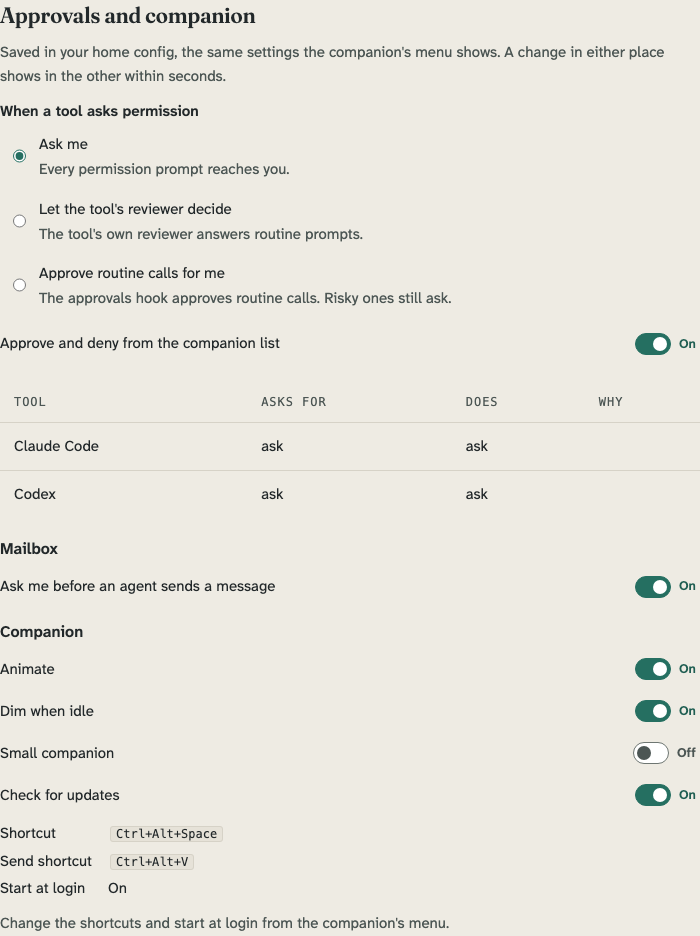
Use the companion's list menu or Settings > Approvals and companion in the user dashboard to select an approvals mode, turn on row approvals, and change companion options. Apply to my tools previews hook and MCP commands, including arguments, with detected credentials masked. A settings save protects edits made after it read the config. In Kiro, review adds the approve-for-me preset while keeping your permission rules. Approvals.
Return to a chat
The companion can open chats on Windows and Linux. It brings supported terminals to the chat's tab and can jump to a teammate's tmux pane. If the server cannot tell whether a terminal session is still running, it shows the command to resume it by hand. Companion list.
Update the installed companion
The update menu shows each step. The macOS app checks the signer before launch and keeps the earlier app until the replacement stays up. Terminal installs can update the CLI and companion together. Companion upgrades.
See the release notes for the remaining fixes.